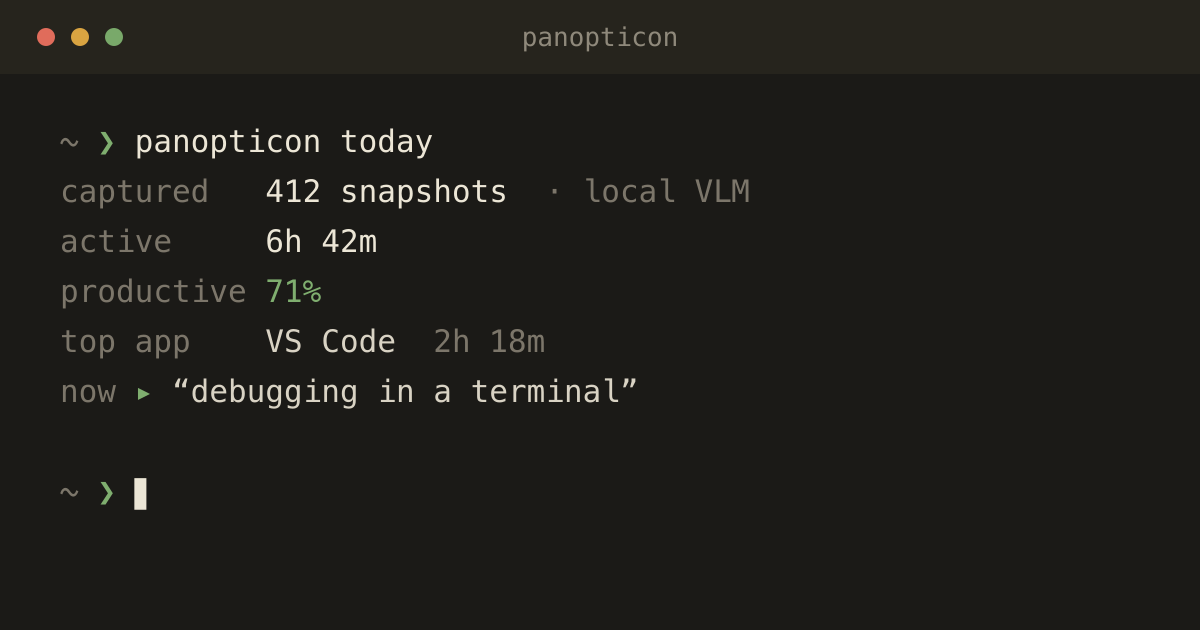
panopticon today — the day rolled up from the local VLM's running commentary: active time, a productivity read, top apps, and what it last saw on screen.
Panopticon
A screen-activity journal — your whole day, watched and described by a vision model that never leaves your Mac.
Bentham's panopticon was a prison where one unseen watcher could see into every cell. This one you point at yourself — and the watcher never leaves the room. A small daemon captures your screens, a local vision model describes what it sees, and the result is a quiet, searchable record of how the day actually went: what you worked on, for how long, and how much of it was the thing you meant to be doing. Because the model runs on your own machine, the screenshots it reads stay there too.
How it works
- Two cadences — Every five seconds it notes the foreground app, window title, and active browser tab — metadata only, no image. Every sixty seconds it screenshots each display.
- A local vision model reads the screen — The screenshots go to qwen2.5-VL running in Ollama on your own machine, which writes a one-line description of what you're doing and a productivity read. No pixels ever leave the Mac.
- It ignores a still screen — Idle detection skips the VLM call when nothing has changed, so the journal stays cheap enough to leave running all day.
- Your rules beat the model — A rules.yml maps domains, apps, and window titles to your own productivity labels; first match wins, checked window title → domain → app → VLM fallback.
- The day becomes an API — A localhost REST service — Bearer-authed, with Swagger at /docs — serves today's summary, app and site breakdowns, and the raw snapshot timeline, so a dashboard, another tool, or an agent can read your activity.
Stays on your machine
- Nothing is transmitted
- — The only network call is to your own local Ollama. There is no cloud, no account, no telemetry.
- Screenshots are disposable
- — panopticon cleanup drops old captures (one day by default); panopticon purge erases everything in one command.
- The API is locked to you
- — It binds to 127.0.0.1 and needs a Bearer token; the key is auto-generated and stored 0600 at ~/.panopticon.
- Two permissions, no more
- — Screen Recording to see the displays and Accessibility to read window titles — nothing else.
A note on the name. A tool that watches your screen all day is exactly the thing you should be suspicious of — so the whole design answers that suspicion: it runs locally, keeps nothing it doesn't need, and hands you the off switch (and the purge button). The point isn't surveillance; it's a private mirror you can choose to look into.
Under the hood
- Python daemon · click CLI
- Ollama · qwen2.5-VL 7B (local)
- Pillow multi-display capture
- FastAPI + Uvicorn REST API
- SQLite store at ~/.panopticon
- Swift menu-bar app (PanopticonBar)
- LaunchAgent auto-start